Showing posts with label Tasha's Playground. Show all posts

Wednesday, November 20, 2013

Familiar Autumn Mini tut...

Supplies Used:
An Autumn Night tube by Zindy. Get it HERE.
Happy Autumn kit from Tasha's Playground. Get it HERE.
Eyecandy 4000 Gradient Glow (Font Only)
Font: Andrea Cursive

What I Used:
Paper 9
Paper 3 (Multiply)
Window (85%)
Leaves 2
Berries 2 (Rotate 90)(60%)(x3)
Leaves (60%)
Branch 3 (Rotate 90)(65%)
Flower Scatter (60%)
Leaf Pile (30%)
Heart (50%)
Mushrooms
Pine Cone (30%)


Wednesday, October 23, 2013

My Curse tut...

Supplies Used:
The Curse Of The Raven tube by Tatjna Art. Get it at PSP Project.
Cursed kit by Tasha's Playground. Get it at PSP Project.
Eyecandy 4000 Gradient Glow (Font Only)
Font: Sanctuary 

Open a new image size 500 by 500.
C/P Frame 5.
Resize by 75%.
Use your selection tool to select the inside of the frame.
Add a new raster layer under the frame layer.
C/P Paper 10 into selection.
Deselect.
C/P Background.
 Resize by 65%.
Position over the center of the paper.
C/P Moon.
Position under the paper layer.
Dropshadow.
C/P your tube.
Dropshadow.
Duplicate frame layer.
Erase any part of the frame over the top of the tube.
Dropshadow original frame layer.
C/P Street Light.
Dropshadow.
Position over the right side of the frame.
C/P Candles.
Dropshadow.
Remove the bottom part of the candles with your eraser tool.
C/P Rock.
Resize by 50%.
Dropshadow.
Position over the bottom right of the frame.
C/P Scatter 2.
Resize by 75%.
Dropshadow.
Position along the bottom of the frame.
C/P Bottle 3.
Resize by 50%. Dropshadow.
C/P Bottle.
Resize by 50%. Dropshadow.
C/P Bottle 2.
Resize by 30%. Dropshadow.
Position bottles over the bottom left corner of the frame.
C/P Rose.
Image, Mirror.
Resize by 30%. Dropshadow.
Position over the bottom center of the bottles.
Type out your font.
Apply inner bevel.
Add gradient glow of 3.
Dropshadow.
Don't forget your copyright & Watermark.


Wednesday, September 18, 2013

Notes At Night mini tut...

Supplies Used:
Tube By Jennifer Janesko. Get it at CDO.
Forever Damask kit from Tasha's Playground. Get it HERE.
Xero SuperSmooth & Illustrator (Close Up Tubes)
Eyecandy 4000 Gradient Glow (Font Only)
Font: Scrap Cursive

What I Used:
Paper 6
Frame 3 (85%)
Branch (50%)
Heart Trio (50%)
Envelopes (50%)
Splat (10%)
Feather (50%)
Flower 3 (60%)
Shoe 


Sunday, September 1, 2013

Toxic Fetish Mini tut....

Supplies Used:
Toxic Fetish Bundle pack from Tasha's Playground & Kiwifire Storm. Get it HERE.
Eyecandy 4000 Glass & Gradient Glow (Font Only)
Alien Skin Eyecandy 5 Textures: Marble (Font Only)
Font: Satisfaction

What I Used:
Splatter (50%)(4x)
Paper 4
Wall (2x)
Lights (50%)
Cage (75%)
Studs (Deform to fit)
Barrel (50%)
Scatter (50%)
Shoe (30%)
Goggles (Flip)(50%)
Word Art 1 (50%)


Sunday, June 9, 2013

Birthday Extravaganza Mini tut...(FTU)

Supplies Used:
Tube by Bam Bam. I got it from MPT Before they closed but it is now available at CDO.
Misfit Birthday kit by Tasha's Playground. Get it from the Creative Misfits Forum.
Eyecandy 4000 Gradient Glow (Font Only)
Font: Space Out

What I Used:
Glitter Spray (75%)
Flair 1 (75%)
Frame 4 (75%)
Balloon 4 (50%)
Balloon 2 (50%)
Present (50%)
Cake Present (50%)
Candle 2 (50%)
Jello Shot (30%)
Bear (50%)


Saturday, June 8, 2013

These Tears Mini tut...

Supplies Used:
Queen Of Darkness tube by Zindy. Get it HERE.
These Tears kit from Tasha's Playground. Get it HERE.
Font: Sheer Grace

What I Used:
Scatter (2x top layer multiply)
Moon
Paper 2
Frame 1 (Rotate 90 degrees)(75%)
Feather
 Lantern (50%)(2x)
Star Scatter (Rotate 90 Degrees) (75%)
Tree (Mirror)(30%)
Chained Hearts (Mirror)(50%)
Petals (30%)(2x)
Cluster (Flip)(75%)
Crow (30%)


Thursday, May 23, 2013

Shy Kitten tut...(FTU)

Supplies Used:
Shy Flower tube by Zindy. Get it free with purchase HERE.
Mixed On May kit by Tasha's Playground. Get it HERE.
Font: Recorda Script

Open a new image size 500 by 500.
C/P Frame 1.
Resize by 75%.
Select the inside of the frame using your magic wand.
Selections, Modify, Expand by 3.
Add a new raster layer. 
C/P Paper 4 into selection.
Deselect.
Dropshadow frame.
C/P Rainbow. 
Click on the frame layer.
Selections, Select all, Float.
Hit delete on the rainbow layer.
Deselect.
C/P Scatter.
Resize by 75%.
Position over the bottom of the frame.
C/P Branch.
Image, Mirror.
Resize by 30%.
Dropshadow.
Position over the bottom right corner of the frame.
C/P Grass.
Resize by 50%.
Dropshadow.
Position over the bottom of the branch.
C/P Flower 3.
Resize by 30%.
Dropshadow.
Position over the bottom of the grass.
C/P your tube.
  Position over the bottom left of the frame.
C/P  Kitteh.
Resize by 30%. Dropshadow.
Position by your tube.
Type out your font.
Apply inner bevel of choice.
Dropshadow.
Don't forget your copyright & Watermark.


Nature's Pond tut...(FTU)

Supplies Used:
Little Cupcake Cutie tube from Zindy. Get it HERE.
Springtime kit from Tasha's Playground. It will be available this weekend (Memorial Day Weekend 2013) at her blog HERE.
Font: Seasons-Spring

Open a new image size 500 by 500.
C/P Frame 1.
Resize by 115%.
Select the inside of the frame using your magic wand.
Selections, Modify, Expand by 3.
Add a new raster layer under the frame layer.
C/P Paper 3 into selection.
Deselect.
C/P Pond.
 Resize by 60%.
Position over the paper where the colors intersect.
C/P Flower Pot 2.
Resize by 60%. Dropshadow.
Position under the left side of the frame.
C/P Grass.
Resize by 30%. Dropshadow.
Duplicate 2 times.
Position under the bottom of the frame.
Dropshadow frame.
C/P Kite.
Image, Mirror.
Resize by 50%. Dropshadow.
Position over the top left of the frame.
C/P Branch 2.
Position over the top left of the frame.
C/P Paper Lantern.
Resize by 20%. Dropshadow.
Duplicate Lantern.
Position lanterns near the knot in the bow.
C/P Butterflies.
Resize by 50%. Dropshadow.
Use your lasso tool to select the largest butterfly.
Hit delete on the keyboard.
Deselect.
Move butterflies to cover the top of the lanterns.
C/P Bunny.
Resize by 40%. Dropshadow.
Position over the bottom left of the frame.
C/P your tube (75%).
Dropshadow.
Position over the right side of the frame.
C/P flower 3.
Position under the frame layer.
Duplicate flower a few times and position around the outside of the frame.
Type out your font.
Apply inner bevel of choice.
Dropshadow.
Don't forget your copyright & Watermark.


Thursday, April 25, 2013

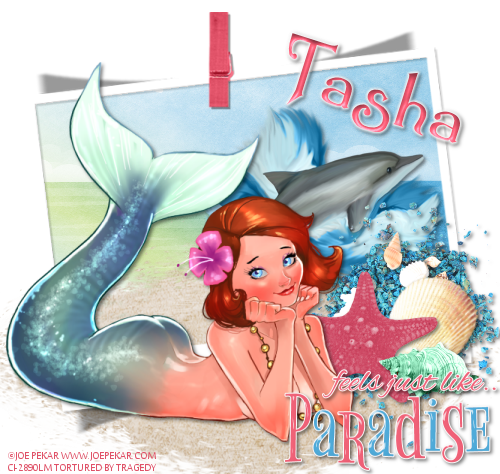
Feels Like Paradise tut...

Supplies Used:
Tube by Joe Pekar. I don't think he sells in any store anymore :( But you can find his work HERE.
Feels Like Paradise kit from Tasha's Playground. Get it HERE.
Eyecandy 4000 Gradient Glow (Font Only)
Font: Summertime

Open a new image size 500 by 500
C/P Frame 1.
Resize by 90%.
Select the inside of the frame using your magic wand.
Selections, Modify, Expand by 3.
Add a new raster layer under the frame layer.
C/P Paper 3 into selection.
Deselect.
C/P Dolphin 1.
Resize by 50%. Dropshadow.
Position over the right water part of the paper.
C/P Sand 2.
Position near the bottom of the frame.
C/P Rocks.
Resize by 50%. Dropshadow.
Position over the bottom right corner of the frame.
C/P Shell 4.
Resize by 50%. Dropshadow.
Position over the bottom right of the rocks.
C/P Starfish.
Resize by 50%. Dropshadow.
Position over the elft side of the shell.
C/P Shell 2.
Resize by 50%. Dropshadow.
Position at the bottom of the white shell.
C/P your tube.
Dropshadow.
C/P Word Art.
Resiz eby 50%. Dropshadow.
Position at the bottom of the shells.
Type out your font.
Apply inner bevel of choice.
Add Gradient Glow of 3 in white.
Dropshadow.
Don't forget your copyright & Watermark.


Friday, April 19, 2013

Princess Meow tut...(FTU)

Supplies Used:
Lana tube by Bonnies Creations. Get it at PFD.
Freebie kit by Tasha's Playground. Get it HERE.
Font: Remachine Script

Open a new image size 500 by 500.
C/P Frame 1.
Resize by 75%. 
Select the inside of the frame using your magic wand.
Selections, Modify, Expand by 3.
Add a new raster layer under the frame layer.
C/P paper 5 into selection.
Add another new raster layer.
C/P paper 1 into selection.
Deselect.
Change the layer property on paper 1 to Luminance (L).
C/P Word Art 2.
Use your deform tool to fit and position inside the left part of the top frame.
Apply inner bevel of choice.
Add Dropshadow.
C/P Scratches.
Resize by 50%. 
Use your deform tool to position under the top right of the word art.
C/P Yarn.
Image. Mirror.
Resize by 50%.
Use your deform tool to position along the bottom of the paper in the top frame.
Dropshadow frame layer.
C/P Milk Bottle 1.
Resize by 50%. Dropshadow.
Position starting where the frames meet on the left side.
C/P Food Dish.
Resize by 40%. Dropshadow.
Posiiton just to the right of the left corner of the frame.
C/P Dead Fish.
Image, mirror.
Resize by 50%. Dropshadow.
Position over the left side of the food dish.
C/P Kitty 1.
Image, Mirror.
Resize by 60%. Dropshadow.
Posiiton over the bottom left corner of the frame.
C/P Mouse.
Resize by 30%. Dropshadow.
Use your deform tool to position the mouse in front of the cat.
C/P your tube.
Dropshadow.
Type out your font.
Apply inner bevel of choice.
Dropshadow.
Don't forget your copyright & Watermark.


Tuesday, April 16, 2013

Daydreaming Spring tut...

Supplies Used:
Daydreaming Fairy tube by Zindy. Get it HERE.
Those Spring Days kit by Tasha's Playground. Get it HERE.
Eyecandy 4000 Gradient Glow (Font Only)
Font: Swan Song

Open a new image size 500 by 500.
C/P Frame 4.
Resize by 75%.
Select the inside of the frame using your magic wand.
Selections, Modify, Expand by 3.
Add a new raster layer under the frame layer.
C/P Paper 5 into selection.
Deselect.
Dropshadow frame.
C/P Vines.
Resize by 50%. Dropshadow.
Position over the top of the frame, Slightly to the left.
C/P Frame 3.
Resize by 75%. Dropshadow.
C/P your tube. 
Dropshadow.
C/P Butterflies.
Image, Mirror.
Resize by 50%. Dropshadow.
Duplicate.
Position butterflies over the left side of the frame.
Type out your font.
Apply inner bevel of choice.
Add Gradient Glow of 3 in white. 
Dropshadow.
Don't forget your copyright & Watermark.


Wednesday, April 10, 2013

Memories tut...

Supplies Used:
Memories 2 tube by Janna Prosvirina. Get it at DSI.
Memories kit by Tasha's Playground. Get it at DSI.
Eyecandy 4000 Gradient Glow (Font Only)
Font: Engrossing Script

Open a new image size 500 by 500.
C/P Window.
Resize by 75%. Dropshadow.
Using your lasso tool select around the inside of the frame.
Add a new raster layer under the frame.
C/P Paper 6 into selection.
Deselect.
C/P Leaves.
Resize by 60%. Dropshadow.
Position near the left middle of the window.
C/P Scatter.
Resize by 50%. Dropshadow.
Position over the leaves.
C/P Flowers.
Resize by 50%. Dropshadow.
Use your deform tool to position over the leaves & Scatter.
C/P Flower 6.
Dropshadow.
Position over the left side of the frame.
C/P Scatter 2.
Resize by 50%. Dropshadow.
Position over the left side of the frame.
C/P Rose.
Resize by 50%. Dropshadow.
Use your deform tool to position on a slight angle near the elements on the bottom left.
C/P Flourish.
Image, Flip.
Resize by 50%. Dropshadow.
Use your deform tool to posiiton over the bottom right corner.
C/P Headband.
Resize by 30%. Dropshadow.
Position over the bottom right corner.
C/P your tube.
Dropshadow.
Type out your font.
Apply inner bevel of choice.
Add Gradient Glow of 5.
Dropshadow.
Don't forget your copyright & Watermark.


Friday, March 29, 2013

Tiny Pirate tut...(FTU)

Supplies Used:
Tube by Barachan. Get it at DSI.
Don't Be A Pirate kit from Tasha's Playground.
Alien Skin Xenophex 2 Burnt Edges
Font: Scriptina

Open a new image size 500 by 500.
C/P Map.
Resize by 125%.
Apply Alien Skin Burnt Edges with the following settings...
Dropshadow.
C/P Sand.
Resize by 50%.
Position over the bottom right of the map.
C/P Sun.
Resize by 75%.
Position over the top right side of the map.
C/P Pirate Ship.
Image, Mirror.
Resize by 75%. Dropshadow.
Position over the left side of the map.
C/P your tube.
Dropshadow.
Position to the right of the ship.
C/P Pirate Treasure.
Image, Mirror.
Resize by 40%. Dropshadow.
Position over the bottom of the tube.
C/P Palm Tree.
Resize by 50%. Dropshadow.
Position to the left of the tube & Chest.
Duplicate Palm Tree and mirror.
Move the trunk of the palm under the sand layer.
C/P Polly.
Resize by 50%. Dropshadow.
Hang from the coconuts on the right palm tree.
C/P Cannon.
Image, Mirror.
Resize by 30%. Dropshadow.
Position near the bottom of the right palm tree.
C/P Word Art 2.
Resize by 50%.
Select inside each letter using your magic wand.
Selections, Modify, Expand by 1.
Add a new raster layer under the word art.
Flood Fill selection with #7f98ff.
Type out your font over the word pirate.
C/P Ship Wheel.
Resize by  40%. Dropshadow.
Position over the left side of the chest.
Using your lasso tool select the inside of the wheel.
Add a new raster layer under the wheel.
C/P Paper 5 into selection.
Deselect.
C/P Rum.
Resize by 30%. Dropshadow.
Position to the right of the wheel.
C/P Coins. 
Resize by 30%. Dropshadow.
Position over the left side of the rum.
Don't forget your copyright & Watermark.


Thursday, March 28, 2013

Goddess Of The Garden tut...

Supplies Used:
Aphrodite tube by Tony T. Get it at HERE.
Greek Goddess kit from Tasha's Playground. Get it HERE.
Eyecandy 4000 Gradient Glow (Font Only)
Font: Gelio Pasteli

Open a new image size 500 by 500.
C/P Mist.
Resize by 75%. Duplicate and mirror.
Position over the center of your canvas.
C/P Gold Dust.
C/P Sun.
Resize by 75%.
Position over the top right of the mist
C/P Columns.
Resize by 75%. Dropshadow.
Use your lasso tool to select around one of the columns.
Edit, Copy.
Delete.
Deselect.
Edit, Paste.
Position the tall column on the left of the canvas.
Position the short column on the right side of the canvas.
C/P Path.
Resize by 50%. Dropshadow.
Position between the bottom of the columns.
C/P Sparkle 2.
Image, Rotate, Free rotate 90 degrees.
Resize by 50%. Dropshadow.
Duplicate.
Position sparkles over the columns.
C/P Branch.
Resize by 50%. Dropshadow.
Duplicate branch.
Use your deform tool to position branches over the tall column.
C/P Well.
Resize by 50%. Dropshadow.
Position at the bottom of the short column.
C/P Scatter.
Resize by 30%.
Position over the well.
C/P Lyre.
Resize by 30%. Dropshadow.
Use your deform tool to position over the bottom right of the well.
C/P Bow 1.
Resize by 30%. Dropshadow.
Duplicate and mirror.
Position near the top of the columns.
C/P Leaves.
Resize by 50%. Dropshadow.
Position over the bottom left column.
C/P Strand.
Resize by 50%. Dropshadow.
Position over the gold leaves.
C/P your tube.
Dropshadow.
Position over the path.
C/P Dove.
Resize by 40%. 
Position over the sun.
Type out your font.
Apply inner bevel of choice.
Dropshadow.
Add Gradient Glow of 3 in white.
Dropshadow.
Don't forget your copyright & Watermark.


Sunday, March 17, 2013

Surviving Spring tut...

Supplies Used:
Survivor tube by Zindy. Get it HERE.
Spring Dreams kit from Tasha's Playground. Get it HERE.
Eyecandy 4000 Gradient Glow (Font Only)
Font: Seasons-Spring

Open a new image size 500 by 500.
C/P Window.
Resize by 65%.
Add a new raster layer under the window.
Use your lasso tool to select around the inside of the window.
C/P Paper 5 into selection.
Deselect.
C/P Cloud 1.
Dropshadow.
Position at the top of the window.
C/P Flower Patch.
Dropshadow.
Position at the bottom of the frame.
C/P Tree.
Resize by 50%. Dropshadow.
Position over the left side of the tall mushroom.
C/P Branch 1.
Resize by 40%. Dropshadow.
Use your deform tool to position over the right side of the flower patch.
C/P Birdhouse.
Image, Mirror.
Resize by 50%. Dropshadow.
Position over the bottom of the flower branch.
C/P Bunny.
Resize by 30%. Dropshadow.
Position at the bottom right of the birdhouse.
C/P Fairy 2.
Resize by 30%. Dropshadow.
Position on the top of the tall mushroom.
C/P Butterflies 2.
Resize by 30%. Dropshadow.
Position over the left side of the flower patch.
C/P Dragonflies.
Resize by 30%. Dropshadow.
Position over the top of the tree.
C/P your tube.
Dropshadow.
Position over the left of the window.
Type out your font.
Apply inner bevel of choice.
Dropshadow.
Add Gradient Glow of 3.
Dropshadow.
Don't forget your copyright & Watermark.


Saturday, March 16, 2013

Pink Kisses tut...

Supplies Used:
Tube by Zlata M. Find her in the Vault HERE.
Kiss My Pink kit by Tasha's Playground. Get it HERE.
Font: Mr. Blaketon

Open a new image size 500 by 500.
C/P Frame 3.
Resize by 70%. Dropshadow.
Using your lasso tool select the area around the section of the frame at the bottom.
Add  new raster layer under the frame layer.
C/P Paper 4 into selection.
Deselect.
Use your lasso tool to select around the frame in the middle of the cluster.
C/P Paper 9 into the selection.
Deselect.
Using your lasso tool select around the top 2 frames.
C/P Paper 7 into selection.
Deselect.
C/P City Scape.
 Resize by 75%.
Using your lasso tool select any part of the city that is outside the side of the frame.
Delete.
Deselect.
Using your lasso tool select the part of the city over the inside of the bottom frame.
Delete.
Deselect.
Dropshadow city.
C/P Nail Polish.
Resize by 50%. Dropshadow.
Position almost to the bottom of the right side of the frame.
C/P Stars.
Image, Mirror.
Resize by 50%. Dropshadow.
Position over the bottom right of the frame.
C/P Lips 2.
Resize by 50%. Dropshadow.
Use your deform tool to position over the stars.
Duplicate lips and resize by 50%. Dropshadow.
Duplicate small lips.
Position lips over the stars.
Type out your font and convert to raster layer.
C/P your tube.
Dropshadow.
Position over the left side of the frame.
Don't forget your copyright & Watermark.


Spring Playground tut...(FTU)

Supplies Used:
Tube By Cuddly Rigor Mortis. Get it at CDO.
Spring Flip kit by Tasha's Playground. Get it HERE.
Mask Of Choice.
Font: SP Pretty Purkey

Open a new image size 500 by 500.
Flood Fill with #00c0c0.
Apply mask of choice & Merge group.
C/P Sun.
Resize by 65%. Dropshadow.
Position near the top left side of the tag.
C/P Cloud 2.
Resize by 40%. Dropshadow.
Duplicate cloud.
Position clouds over the mask.
C/P Tree 2.
Resize by 75%. Dropshadow.
Position to the left side of your canvas.
C/P Swirl.
Resize by 75%. Dropshadow.
Position starting near the bottom of the tree.
C/P Grass.
Resize by 65%. Dropshadow.
Duplicate and mirror.
Position grass near the bottom of the tree.
C/P Birdhouse.
Resize by 40%. Dropshadow.
Position over the tree branch.
C/P Mushroom.
Resize by 50%. Dropshadow.
Position to the bottom left of the tree.
C/P Raspberries.
Resize by 30%. Dropshadow.
Position at the bottom of the mushroom.
C/P Lady Bug.
Resize by 25%. Dropshadow.
Position to the right of the raspberries.
C/P your tube.
Dropshadow.
Type out your font.
Apply inner bevel of choice.
Add Dropshadow.
Don't forget your copyright & Watermark.


Saturday, March 9, 2013

Celtic Serenity tut...

Supplies Used:
Celtic goddess tube by Rebecca Cox. Now Available at ADI.
Serenity kit by Tasha's Playground. Get it HERE.
Eyecandy 4000 Gradient Glow (Font Only)
Font: Paul's Illuminated Celtic

Open a new image size 500 by 500.
C/P Frame 2.
Resize by 75%.
Select the inside of the frame using your magic wand.
Selections, Modify, Expand by 3.
Add a new raster layer under the frame layer.
C/P Paper 7 into selection.
C/P your tube.
Selections, Invert, Delete.
Deselect.
Dropshadow tube and frame.
C/P Water.
 Resize by 65%.
Position at the bottom left of the frame.
C/P Waterfall.
Resize by 65%.
Position over the left side of the frame.
C/P Tree.
Resize by 60%. Dropshadow.
Position near the bottom of the waterfall.
C/P Stones.
Resize by 30%.
Dropshadow.
Position over the bottom of the tree.
C/P Cattail 1.
Resize by 75%. Dropshadow.
position over the right side of the frame.
C/P Grass Mound.
Resize by 55%. Dropshadow.
Position over the bottom right of the frame.
C/P Log.
Resize by 30%. Dropshadow.
Position near the left side of the grass.
C/P Deer.
Resize by 30%. Dropshadow.
position standing on the log.
C/P Flower 5.
Resize by 30%. Dropshadow.
Position over the left side of the log.
C/P Flower 1.
Image, Mirror, Flip.
Resize by 20%. Dropshadow.
Position under the green flower.
C/P Wolf 2.
Resize by 40%. Dropshadow.
Position over the left side of the log.
C/P Dragonfly.
Resize by 20%. Dropshadow.
Use your deform tool to position on a slight angle.
Duplicate dragonfly & mirror.
Position over the grass and cattail.
Type out your font.
Apply inner bevel of choice.
Add Gradient Glow of 3.
Dropshadow.
Don't forget to add your copyright & Watermark.


Wednesday, March 6, 2013

Irish Girl tut

Supplies Used:
Irish Cutie tube by Zindy. Get it HERE.
Lucky Girl kit by Tasha's Playground. Get it HERE.
Eyecandy 4000 Gradient Glow (Font Only)
Font: Seasons-Spring

Open a new image size 500 by 500.
C/P Frame 1.
Resize by  75%.
Select the inside of the frame using your amgic wand.
Selections, Modify, Expand by 3.
Add a new raster layer under the frame layer.
C/P Paper 9 into selection.
Deselect.
Dropshadow frame layer.
C/P Beer 2.
Resize by 50%. Dropshadow.
Duplicate beer.
Posiiton about halfway up the left side of the frame.
C/P Bottle.
Resize by 50%. Dropshadow.
Position between the pints.
C/P Cupcake Pop.
Resize by 50%. Dropshadow.
Use your deform tool to position on an angle with the stick over the bottom of the bottle and beer.
C/P Pot Of Gold.
Resize by 40%. Dropshadow.
Position over the bottom right of the beers and bottle.
C/P Hat.
Resize by 45%. Dropshadow.
Position to the left of the pot of gold.
C/P Trail.
Resize by 75%. Dropshadow.
Position near the bottom of the frame.
C/P your tube.
Dropshadow.
Type out your font.
Convert to raster layer.
Apply inner bevel of choice.
Add Gradient Glow of 5.
Dropshadow.
Don't forget your copyright & Watermark.


Irish Peace tut...(FTU)

Supplies Used:
Tube By Suzanne Wolcott. Get it HERE. (Get it fast she closes 3/14)
50 Shades Of Shamrock kit from Tasha's Playground. Get it HERE.
Eyecandy 4000 Gradient Glow
Font: Twinkle Star Rob

Open a new image size 500 by 500.
C/P Frame 3.
Dropshadow.
C/P Frame 5.
Resize by 85%.
Select the inside of the frame using your magic wand.
Selections, Modify, Expand by 3.
Add a new raster layer under the frame layer.
C/P Paper 5 into selection.
Deselect.
C/P your tube.
Dropshadow.
Duplicate frame layer and move above your tube.
Use your eraser tool to remove the part of the frame over the top of the tube.
Dropshadow original frame layer.
C/P Grass.
Resize by 75%.
Dropshadow.
Position slightly to the left of the bottom of the frame.
C/P Flower 4.
Resize by 75%. Dropshadow.
Position under the left edge of the grass.
C/P Rainbow.
Resize by 50%.
Image, Mirror.
Position over the grass.
C/P Butterfly.
Dropshadow.
Position over the right side of the grass.
C/P Heart.
Resize by 75%.
Dropshadow.
Use your Deform tool to position the heart under the butterfly wings.
Type out your font.
Convert to raster layer.
Apply inner bevel of choice.
Add Gradient Glow of 5.
Dropshadow.
Don't forget your copyright & Watermark.