Sunday, February 15, 2015

Pleasure & Pain tut...(FTU)

What I Used:
Chained To The Pain kit from Gothic Inspirations. Get it from her blog HERE.
Miki tube from Celinart Pinup. Get it at her store HERE.
Eyecandy 4000 Gradient Glow (Font Only)
Font: Selfish

Open a new image size 500 by 500.
C/P Mesh.
Resize by 65%.
Dropshadow.
C/P Spill.
Dropshadow.
C/P Window Goth 2.
Resize by 65%.
C/P Leaves.
Resize by  75%.
Dropshadow.
Move under the window layer.
Use your deform tool to position under the left side of the window.
Duplicate and mirror.
Using your magic wand select the inside of the window.
Add a new raster layer.
C/P Paper 13 into selection.
Deselect.
Move under window layer.
Dropshadow window.
C/P Cage 1.
Resize by 40%.
Dropshadow.
Position under the top of the window.
C/P Poser 2.
Image, mirror.
Resize by 20%.
Dropshadow.
Position over the middle of the cage.
C/P Lights.
Resize by 40%.
Dropshadow.
Position over the top of the cage.
Use your eraser tool to remove any excess outside of the frame.
C/P Teaser.
Move above the window layer.
Resize by 75%.
Use your deform tool to position starting near the bottom of the frame.
Dropshadow.
C/P Cadle 1.
Resize by 30%.
Dropshadow.
Duplicate candle.
Position candles near the bottom left corner of the window.
C/P Pillows.
Resize by 30%.
Dropshadow.
Position over the bottom of the teaser and candles.
C/P Collar.
Resize by 30%.
Position near the center of the bottom pillows.
Use your eraser tool to remove what would be the back of the collar.
Dropshadow.
C/P Cuffs Bondage.
Resize by 30%.
Dropshadow.
Position over the right of the top pillow.
C/P Paddle.
Resize by 30%.
Use your deform tool to position near the bottom right of the pillows.
Dropshadow.
C/P Wine.
Resize by 30%.
Dropshadow.
Position to the left side of the paddle.
C/P Lipstick.
Resize by 30%.
Use your deform tool to position to the bottom right of the bottle.
Dropshadow.
C/P your tube.
Dropshadow.
Type out your font.
Apply inner bevel of choice.
Add black gradient glow of 3.
Dropshadow.
Don't forget to add your copyright and watermark.


Monday, February 9, 2015

Reaper's Widow tut...

Supplies Used:
Anna tube by Celinart Pinup. Get it HERE.
Follow The Reaper kit from Manipulated by Magik. Get it at Mystical Scraps.
Eyecandy 4000 gradient Glow (Font only)
Mask Of Choice
Font: Zombified

Open a new image size 500 by 500.
Selections, Select all.
C/P Paper 17 into selection.
Deselect.
Apply mask of choice.
Layers, Merge group.
C/P Sparkles.
Position over the top of the mask.
Image, Duplicate.
Image, Flip.
Image, Mirror.
C/P Arch.
Dropshadow.
Position to the left side of the tag.
C/P Catafalque.
Resize by  75%.
Dropshadow.
Use your eraser tool to remove any part of the arch that shows inside the catafalque.
C/P Roses.
Resize by 75%.
Dropshadow.
Position over the left side of the catafalque.
C/P Gravestone.
Resize by 75%.
Dropshadow.
Position just over the bottom of the rose on the right.
C/P Flowers.
Resize by 75%.
Dropshadow.
Position over the left side of the gravestone.
C/P Grave.
Resize by 75%.
Dropshadow.
Position at the bottom left of the Catafalque.
If needed use your eraser tool on the flowers layer to remove the bottom of the bow.
C/P Thorned Heart.
Resize by 25%.
Dropshadow.
Position on top of the headstone.
C/P your tube.
Dropshadow.
Position over the right side of the catafalque.
Type out your font at the bottom of the grave.
Apply inner bevel of choice.
Add eyecandy gradient glow of 3 in black.
Dropshadow.
Don't forget to add your copyright and watermark.


Lover Letters tut...(FTU)

Supplies Used:
Joanna Ange tube from Celinart Pinup. Get it HERE,
Valentines for Alexis kit from Manipulated By Magik. Get it HERE.
Font: Scrap Cursive
Mask Of Choice.

Open a new image size 500 by 500.
Selections, Select all.
C/P Paper 6 into selection.
Deselect.
Merge group.
C/P Journal.
Image, Rotate, Free rotate 15 degrees right all layers unchecked.
Dropshadow.
C/P Rose Deco.
Resize by 75%.
Image, Flip.
Image, Rotate, Free rotate 15 degrees right all layers unchecked.
Position along the top of the journal.
Dropshadow rose deco.
C/P Rose.
Resize by 60%.
Use your eraser tool to remove the stem of the rose over the pen.
Dropshadow.
C/P Sparkles.
Resize by 75%.
Dropshadow.
Position over the right side of the journal.
C/P Falling Hearts.
Resize by 50%.
Dropshadow.
Position near the bottom right of the journal.
C/P Letter.
Resize by 50%.
Dropshadow.
Position near the bottom center of the RIGHT side of the journal.
C/P Photo.
Resize by 30%.
Image, Rotate, Free rotate 15 degrees right all layers unchecked.
Dropshadow.
Duplicate photo.
Image, Mirror.
Position under the right of the original pic layer.
C/P your tube.
Dropshadow.
Tye out your font.
Convert to raster layer.
Apply inner bevel of choice.
Add dropshadow.
Don't forget your copyright and watermark!


Wednesday, February 4, 2015

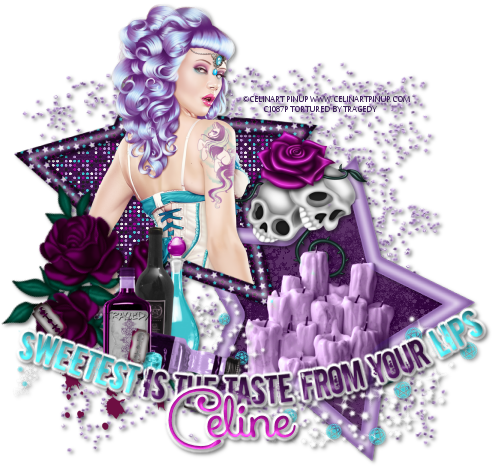
Sweetest Lips tut...

Supplies Used:
Elsa Tube from Celinart Pinup. Get it HERE.
Razorblade Kiss kit from Manipualted by Magik. Get it at Mystical Scraps.
Eyecandy 4000 Gradient Glow
Font: Xiomara

Open a new image size 500 by 500.
C/P Glitter scatter.
resize by 75%.
Dropshadow.
C/P Frame 4.
Resize by 75%.
Using your magic wand select the inside of the right frame.
Selections, Modify, Expand by 5.
Add a new raster layer under the frame layer.
C/P Paper 5 into selection.
Deselect.
Click your frame layer again.
Using your magic wand select the top left frame and any remaining empty spaces.
Selections, Modify, expand by 5.
Click on your paper layer.
C/P Paper 17 into selection.
deselect.
C/P your tube.
Dropshadow.
Position tube as desired.
Duplicate the frame layer and move over your tube.
Use your eraser tool to remove any parts of the frame you do not want on the tube.
Erase the bottom of the tube that is showing under the frame.
Dropshadow original frame layer.
C/P Skulls 1.
Resize by 40%.
Dropshadow.
Position over the gap in the center of the frame.
C/P candles.
Resize by 40%.
Dropshadow.
Position over the bottom frame.
Change the layer property to Luminance (l).
C/P Sparkles and heartagrams.
Resize by 75%.
Dropshadow.
Use your deform tool to position as desired at the bottom of the frame.
C/P Roses 2.
Resize by 65%.
Dropshadow.
Use your deform tool to position over the bottom left of the frame.
C/P Liquor.
Resize by 40%. Dropshadow.
Position to the right of the rose blossoms.
C/P Blades and blood.
Resize by 40%.
Dropshadow.
Image,flip.
Position near the bottom of the bottles.
C/P Word Art 4.
Resize by 75%.
Apply inner bevel of choice.
Dropshadow.
Add eyecandy 4000 fat gradient glow of 3.
Dropshadow.
Position at the bottom of the frame.
Type out your font.
Apply inner bevel of choice.
Dropshadow.
Add eyecandy 4000 fat gradient glow of 3.
Dropshadow.
Position at the bottom of the frame.
Don't forget to add your copyrights and watermark :P
 

Tuesday, February 3, 2015

Rockin Weekend tut

Supplies Used:
Vikki tube by Celinart Pinup. Get it Here.
Hearts At War kit from Manipulated By Magik. Get it at Mystical Scraps.
Eyecandy 4000 Gradient Glow 
Fonts: Xiomara script and the quiet scream.
 
Open a new image size 500 by 500.
C/P Frame 1.
Resize by  75%.
Select the inside of the frame using you magic wand.
Selections, modify, Expand by 20.
Add a new raster layer and move under your frame layer.
C/P Paper 17 into selection. 
Deselect.
C/P Light Effect.
Position under the bottom right corner of the frame.
Using the Xiomara font type out the "Have a" and "Weekend!"
Convert to raster layer.
Add inner bevel of choice.
Dropshadow.
Add fat Gradient Glow of 3.
Dropshadow.
Using the quiet scream font type out rockin' in lower case.
Convert to raster layer.
Apply white drop shadow.
Add fat Gradient glow of 3...tab 2 should look like this...
 Apply black drop shadow.
Dropshadow frame layer.
C/P Skulls and rose.
Resize by 30%.
Dropshadow.
Position over top right corner of the frame.
Duplicate and mirror.
C/P Speaker.
Image, Mirror.
Resize by 60%.
Dropshadow.
Position just outside of the bottom right side of the frame.
C/P Rock Chick.
Image, mirror.
Resize by 50%. 
Dropshadow.
Position just left of the speaker.
C/P Ticket.
Resize by 25%.
Use your deform tool to position on a slight angle over the bottom right foot of the rock chick.
Duplicate ticket.
Use your deform tool to position just over the bottom ticket.
Adjust sharpness, sharpen.
Dropshadow both ticket layers.
C/P Guitar 1.
Resize by 50%.
Image, Mirror.
Dropshadow.
Position over the left foot of the rock girl.
C/P your tube over the left of the frame.
Dropshadow.
Apply tour name using the quiet scream font in lower case letters.
Add white drop shadow.
Repeat gradient Glow from before.
Add dropshadow in black.
Don't forget to add your copyright & Watermark!